
Loyalty Actions
The Loyalty Action section under Member Details provides a detailed overview of all loyalty-related transactions for a specific member. This section allows you to monitor point-earning and redemption activities, providing insights into a member’s engagement with the loyalty program.
Each transaction reflects changes in points and the overall balance after every event, helping you track loyalty program activity accurately.
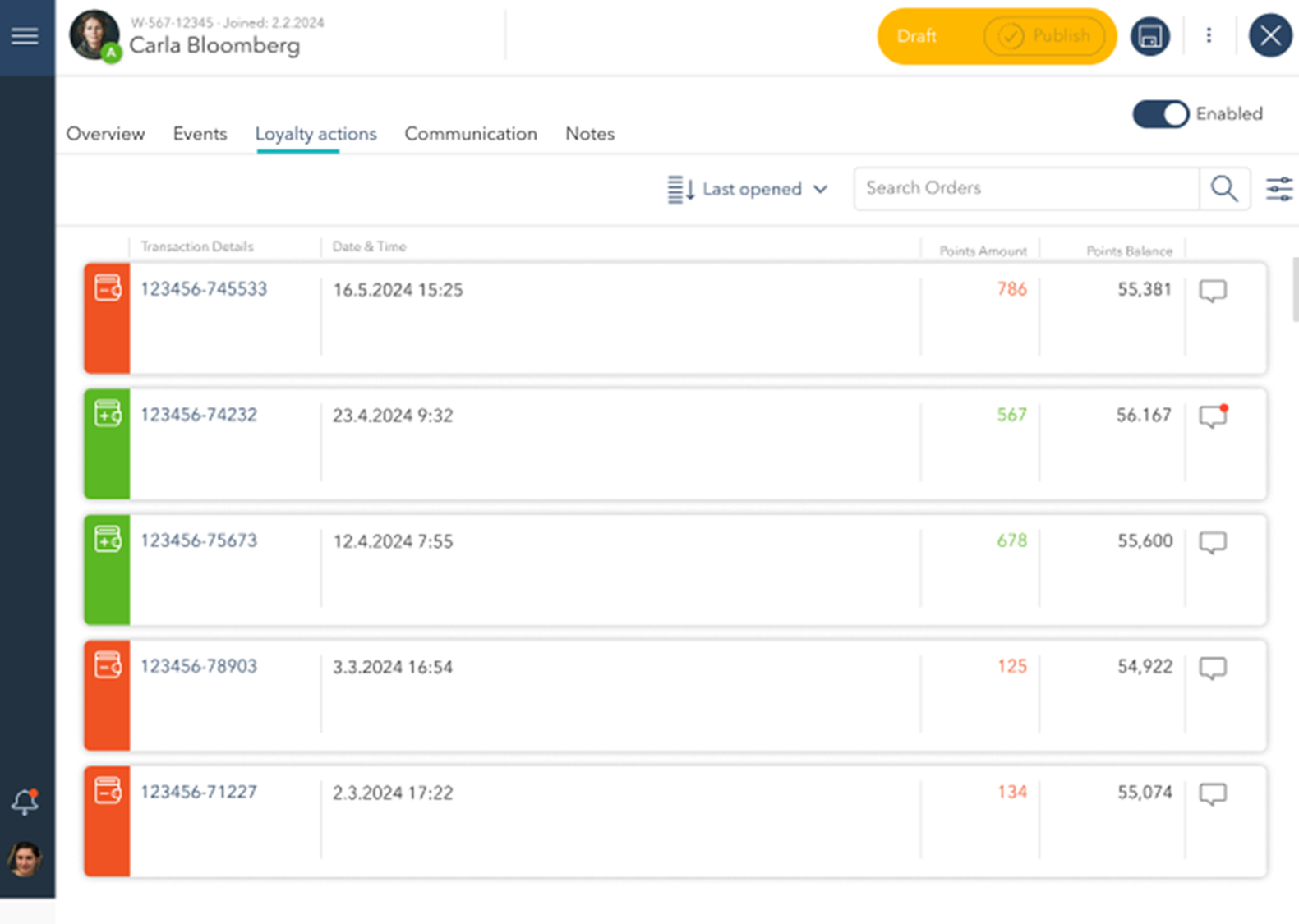
Loyalty Transaction Details
Each entry in the list consists of the following columns:
Transaction ID: A unique identifier for each loyalty-related transaction.
Date & Time: The exact date and time when the transaction occurred.
Points Amount:
Green numbers indicate points earned from purchases or specific loyalty actions.
Red numbers represent points redeemed or deducted due to redemptions or penalties.
Points Balance: Shows the total number of points available in the member’s account after the transaction has been processed.

Visual Indicators
Green indicator: Indicates that points have been earned from the transaction.
Red indicator: Indicates that points have been redeemed or spent during the transaction.
Red Dot Notification: Appears next to a transaction with an unread comment or notification, signaling that further attention or review may be needed.