
Communication
The Communication section under Member Details allows you to monitor and manage all communications sent to a specific member. This includes different message channels such as Email, SMS, Viber, and Push notifications. It provides a detailed overview of past interactions, their status, and delivery outcomes.
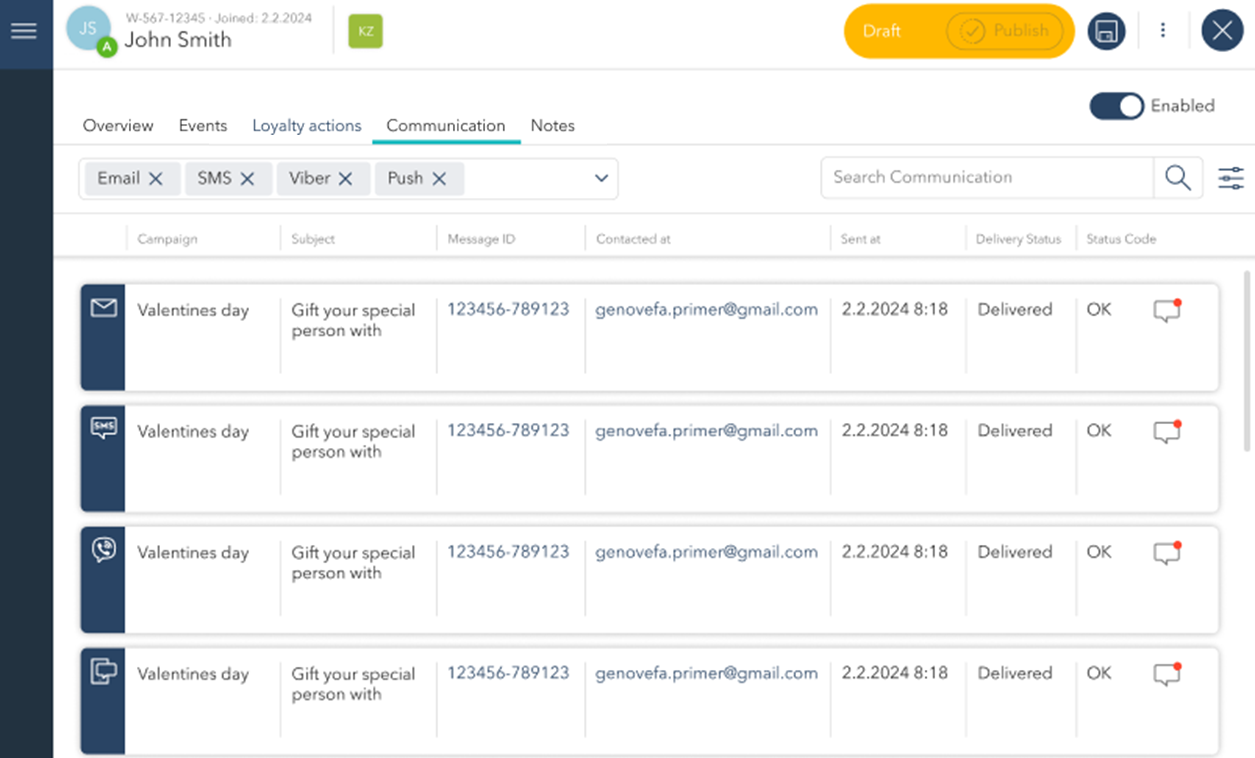
Filtering Communication Channels
You can apply or remove filters to focus on specific types of communication. The search bar also allows you to quickly find specific messages by keywords, subject, or recipient.
Communication Details
Each message entry displays the following information:
Campaign: The name of the campaign under which the message was sent (e.g., Valentine’s Day).
Subject: The subject line of the message or the main text content for SMS/Viber.
Message ID: A unique identifier for each message, allowing you to track individual communications.
Contacted At: The email address, phone number, or user ID the message was sent to.
Sent At: The date and time when the message was sent.
Delivery Status: Indicates whether the message was successfully delivered (e.g., Delivered).
Status Code: Provides technical confirmation of the message status (e.g., OK for successful delivery).
Different icons next to each message represent the communication channels used, such as Email, SMS, Viber, or Push notifications.