
Segments Overview
The Segments section focuses on organizing audience members into actionable groups based on shared attributes or behaviors. This feature is essential for targeted communication, campaign management, and audience analysis. In the following sections, you will find an overview of how to manage segments, including searching, filtering, sorting, and viewing segment details.
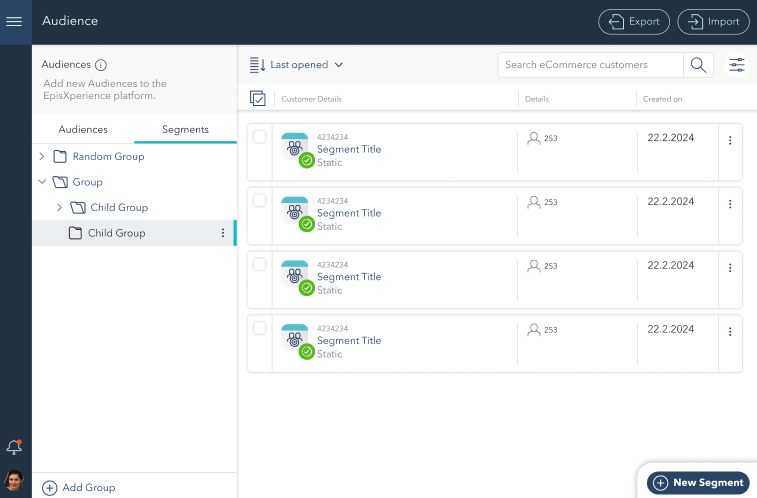
Segment Hierarchy:
The left-hand panel displays a hierarchical view of segments, showing parent and child relationships.
Parent and Child Groups: Segments are organized in a tree structure, with parent groups containing child groups for better organization.
Use the Add Group button at the bottom-left of the panel to create a new group or subgroup.
Search, Filter, and Sort:
Use the Search bar at the top of the interface to locate segments by name or type.
Apply filters to narrow the view by specific criteria, such as segment attributes or creation date.
Sort options, located to the left of the search bar, allow you to reorder the segment list by attributes such as name, type (e.g., static or dynamic), or creation date.
Segment List:
Displays all segments in a structured format with key details, including:
Name: The name of each segment for easy identification.
Type: Indicates whether the segment is static or dynamic
Number of Members: Shows the total number of members in the segment.
Creation Date: Provides the creation date for organizational purposes.
View Segment Members: Clicking on a segment opens a detailed view of its members:
Total Members: The total number of members in the segment is displayed at the top of the page, providing a quick overview of segment size.
Member List: Displays detailed information about each member, including name, email, loyalty tier, and achievements.
Add New Segment
The New Segment button at the bottom-right corner opens a new window where you can define all segment details. Provide the segment name, select the type (static or dynamic), and set criteria to group audience members effectively.