
Managing Loyalty Programs
The Loyalty Programs section provides tools to help you create, manage, and analyze loyalty programs within your organization. From getting an overview of a program’s performance to configuring the details of how it operates, this section gives you the flexibility and control to tailor loyalty initiatives to your specific needs.
Loyalty Program Overview
The Loyalty Program entry point provides a quick snapshot of your program's key statistics, helping you stay informed about its performance. From here, you can access detailed information or edit the program configuration as needed. The entry point includes:
Number of Members: Displays the total number of members enrolled in the program.
Markets: Shows where the program is active, indicating regions or countries.
Points Configured: Lists the point systems in use, such as specific types of points available for earning and spending.
Tier Levels: Shows the various membership tiers within the program (e.g., Gold, Silver, Bronze, VIP).
Partners and Active Journeys: Provides an overview of the number of partners participating and the active customer journeys within the program.
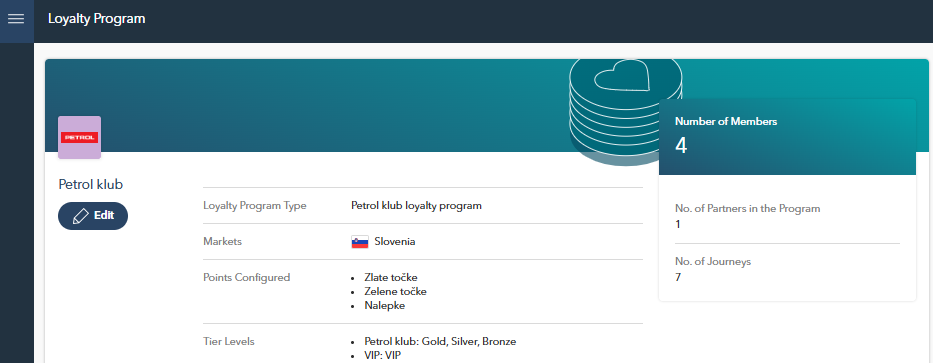
By clicking the Edit button on the Loyalty Program Overview page, you will be taken to the Loyalty Program Configuration page, where you can define or modify essential program settings.
Loyalty Program Configuration
Let’s dive deeper into the Loyalty Program Configuration in the following section to understand how to set up and manage specific program settings.