
Store Groups and Overview
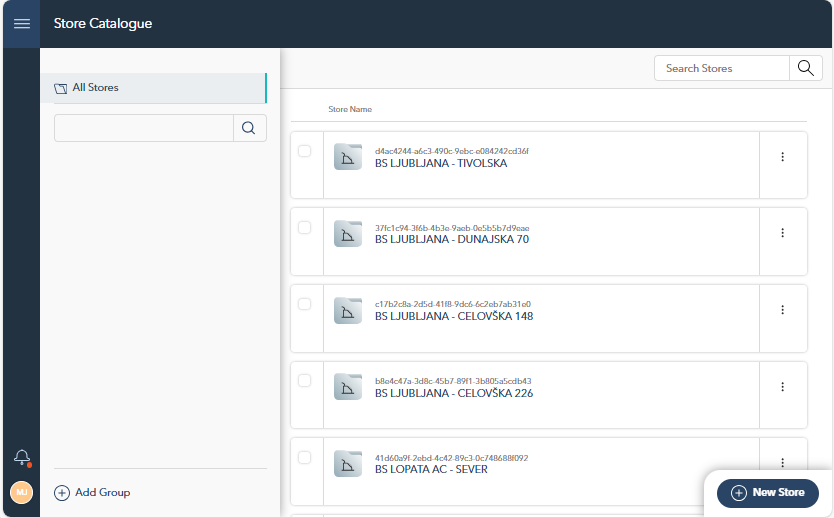
The Store Catalogue section provides a comprehensive interface for managing and organizing all stores. Stores can be categorized into groups, allowing for easy organization and navigation.
Store Groups: Create store groups to organize and manage your stores more efficiently. You can easily add a new group by clicking the "Add Group" button, then providing a group name. This helps to maintain a clear structure as the number of stores grows.
Store Overview: Browse through your stores in a structured list, where each store is displayed with its name and unique identifier. You can search for specific stores using the Search bar at the top.
Store Details
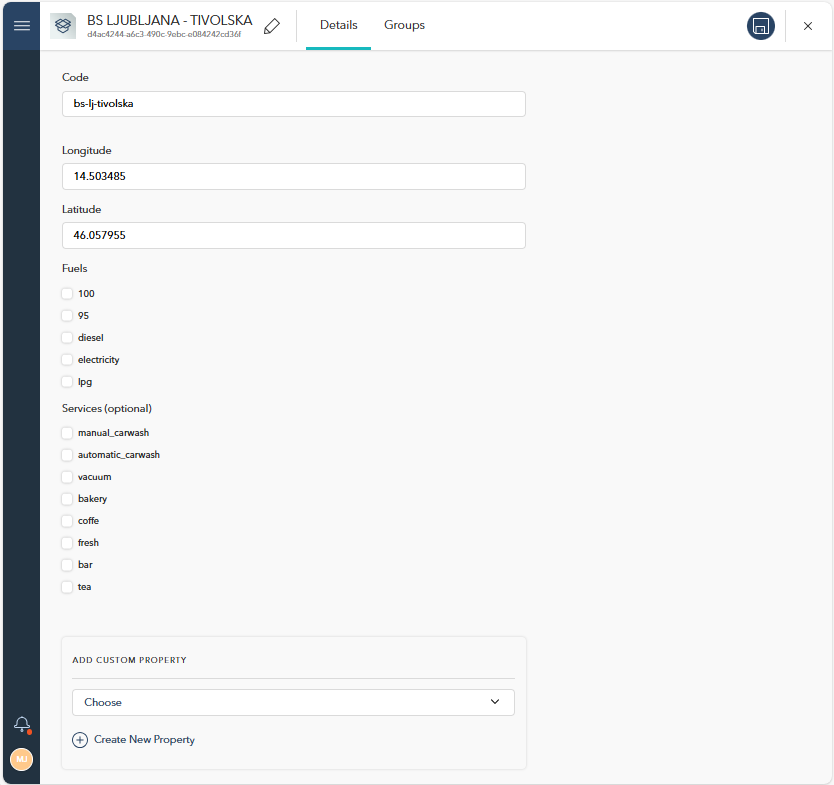
After selecting a store by clicking on it from the list on the Store Catalogue page, you'll be presented with the Store Details section. This section provides detailed information about the selected store and allows you to edit various attributes. The Store Details page is divided into two main tabs: Details and Groups, which help you manage both the core attributes and the group associations of each store.
1. Details Tab
In the Details tab, you can manage the core attributes of the store, including:
Code and Location Data: These fields allow you to define the unique store code as well as its geographical information, such as coordinates or address.
Available Features: Select from predefined store features (e.g., available services, equipment, or product types offered at the store).
Custom Properties: You can add or create custom properties to tailor the store to specific business needs, giving you flexibility in adding additional attributes that are relevant for your operations.
2. Groups Tab
The Groups tab shows all the store groups to which the store is assigned. It provides a hierarchical view of the store’s placement in various groups and subgroups, allowing you to see how the store is categorized within the broader catalogue.