
Reward Management
Navigation
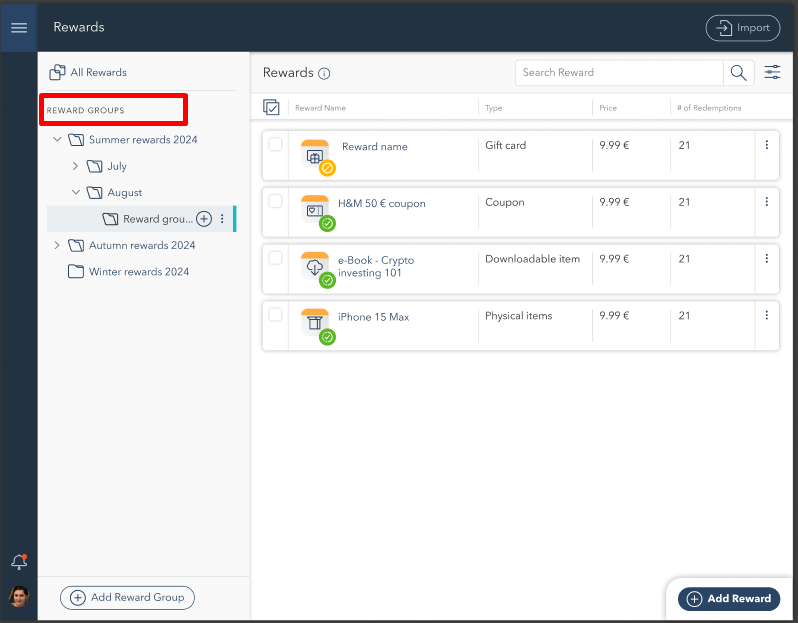
On the left-hand side, the Rewards Groups section displays all available reward categories. Users can expand or collapse groups to view the contained rewards. The navigation panel allows users to:
Browse and select reward groups.
Add new reward groups using the + Add Reward Group button.
Expand nested reward categories for better organization.
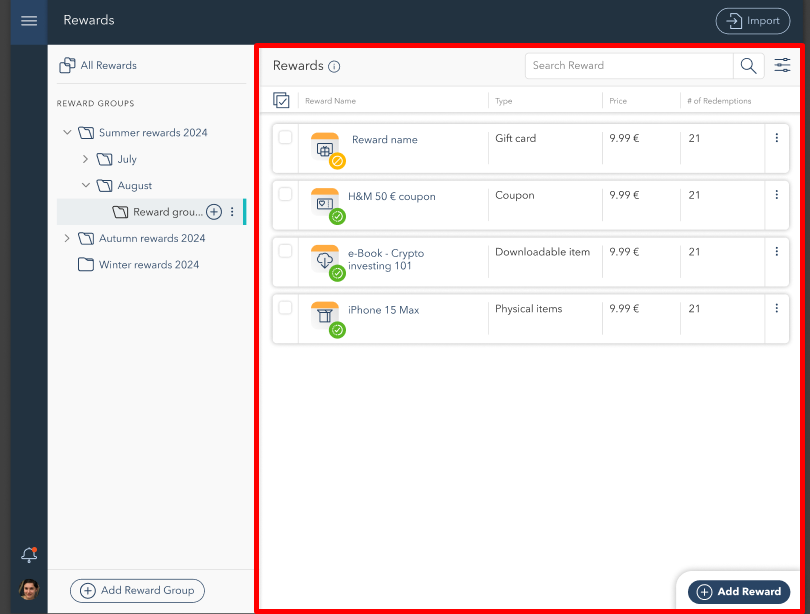
On the right-hand side, the Rewards section displays all rewards within the selected group. Each entry includes:
Reward Name
Type (Gift Card, Coupon, Downloadable Item, Physical Item)
Price
Number of Redemptions
Status Indicators
Additionally, the Actions Menu is available at two levels:
For entire reward groups.
For individual rewards.
This allows users to manage groups or individual items efficiently.
Sorting, Searching, and Filtering Rewards
To quickly find or organize rewards, you have several options available:
Sorting: Use the sorting dropdown to order rewards by name, price, or redemption count.
Searching: Use the search bar at the top-right corner to find a specific reward by entering its name or relevant keywords.
Filtering: Click the Filter button next to the search bar to open the filtering panel. Define conditions such as reward type or price range. At least one condition is required for filtering.