
Adding a New Reward
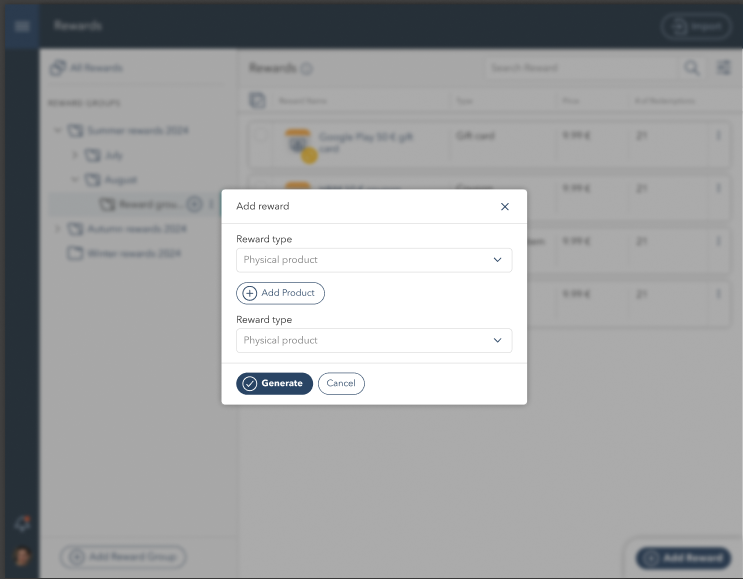
The Add Reward button allows users to create new rewards. Clicking it opens a pop-up where users can select the Reward Type, such as Physical Product, Digital Product, or Coupon. Once a type is selected, users can configure reward details.
Adding a Physical Product Reward
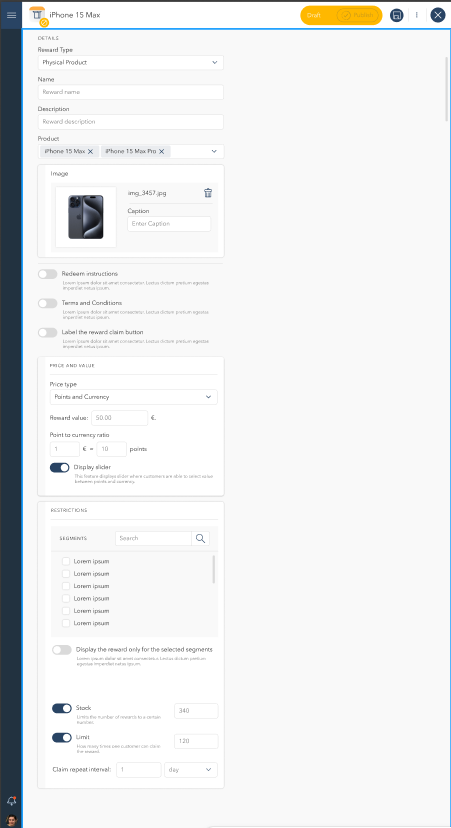
For Physical Products, users can enter a reward name, description, and upload an image. Additional toggles are available for:
Redeem Instructions – Enable or disable redeem guidance for users.
Terms and Conditions – Optionally display specific terms.
Label the Reward Claim Button – ?
Price and Value Settings
Price Type – Select either Points and Currency.
Reward Value – Define the price of the product in currency.
Points to Currency Ratio – Specify conversion rates for users redeeming with points.
Display Slider – Enable a value-adjusting slider for flexible redemption.
Restrictions and Availability
Segments – Limit availability to specific user segments.
Stock – Set stock limits to control availability.
Limit – Restrict how many times a customer can claim the reward.
Claim Repeat Interval – Define how often the reward can be redeemed.
Once all details are completed, users click Generate to finalize the reward. The new reward then appears in the Rewards list under the selected category.
Adding a Digital Product (Coupon)
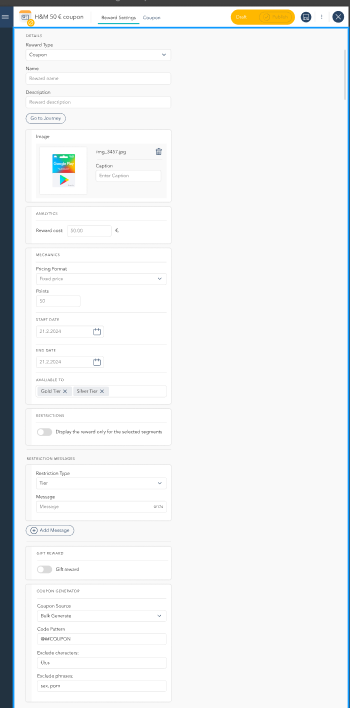
For Digital Products (Coupons), users can similarly provide a name, description, and image. Reward cost is defined in currency, while the Mechanics section allows setting pricing formats and point values for redemption. Availability is managed through start and end dates, and users can assign specific customer tiers. Restriction messages can be configured to display specific conditions.
Once all details are completed, users click Generate to finalize the reward. The new reward then appears in the Rewards list under the selected category.
Managing Coupons
For digital rewards such as coupons, an additional Coupon section provides a detailed status overview. Coupons can have statuses such as Unassigned, Claimed, Redeemed, Expired, or Invalid. Bulk management actions are available, including importing, generating, and invalidating coupons.